Prev @ the LEGO Group
A Filtering System for Part-Finding at the lEGO Group
Part-Finding Filtering at the LEGO Group
2025

OVERVIEW
6 Months Immersed in LEGO Design Culture
This year, I interned at the LEGO Group’s BrickLink office — one of the most creative and playful design cultures I’ve ever been part of. I loved designing for a passionate community of builders who often knew the product even better than we did.

This office made work feel like play
i worked on BrickLink Studio, a Digital Building Platform by the lego group
Studio is the official digital building app from the LEGO Group, used by over 160,000 fans worldwide. The platform allows builders to choose from thousands of LEGO bricks to create and share digital models, making it a popular tool for LEGO fans.
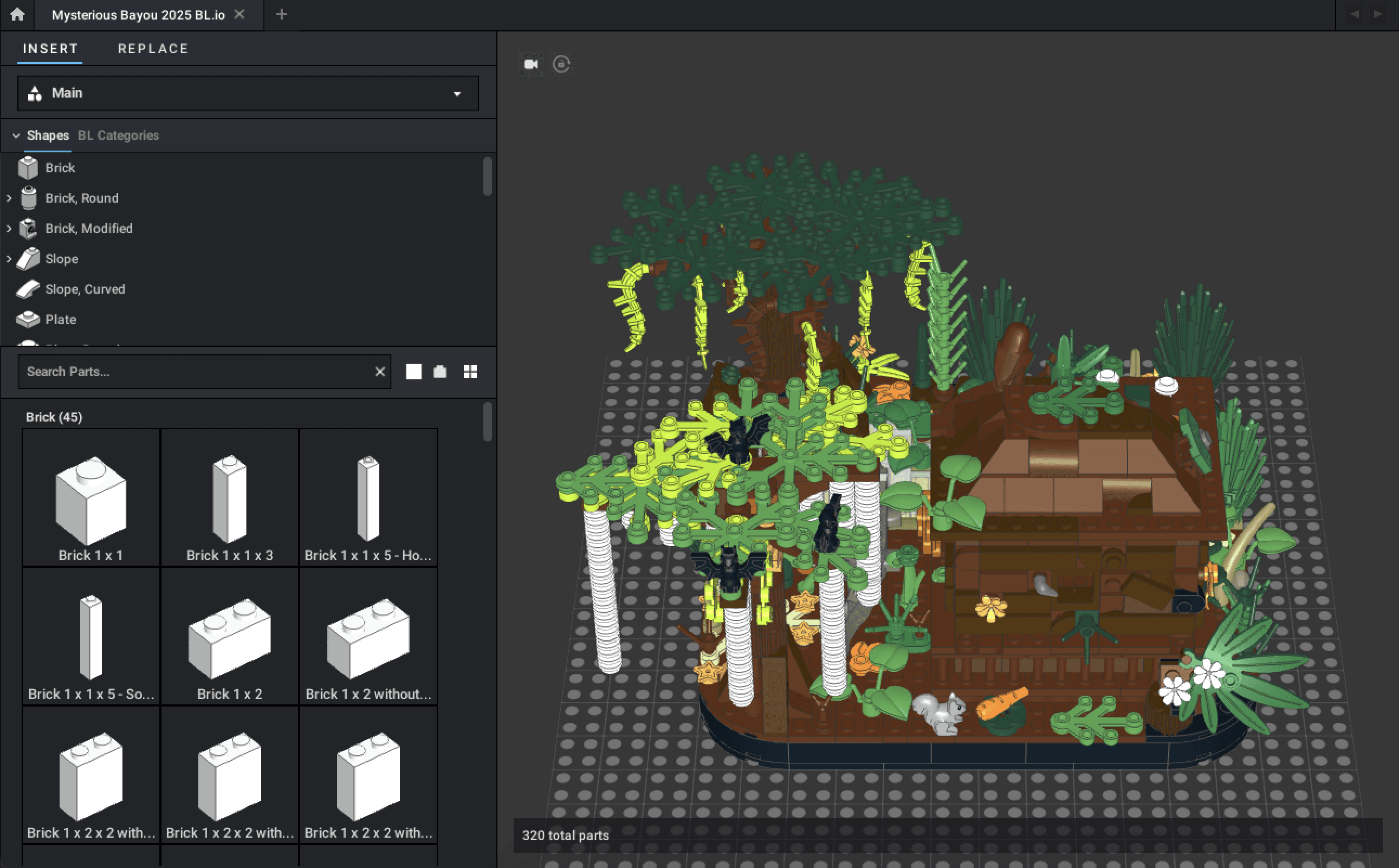
Studio interface with the Part Finder panel on the left
the problem: users couldn't find parts in studio
Most TV apps are built for long videos—but text apps unlock an entirely different kind of content. Text allows people to post in real time, unfiltered. It’s why news surfaces on Twitter or Threads long before TikTok:
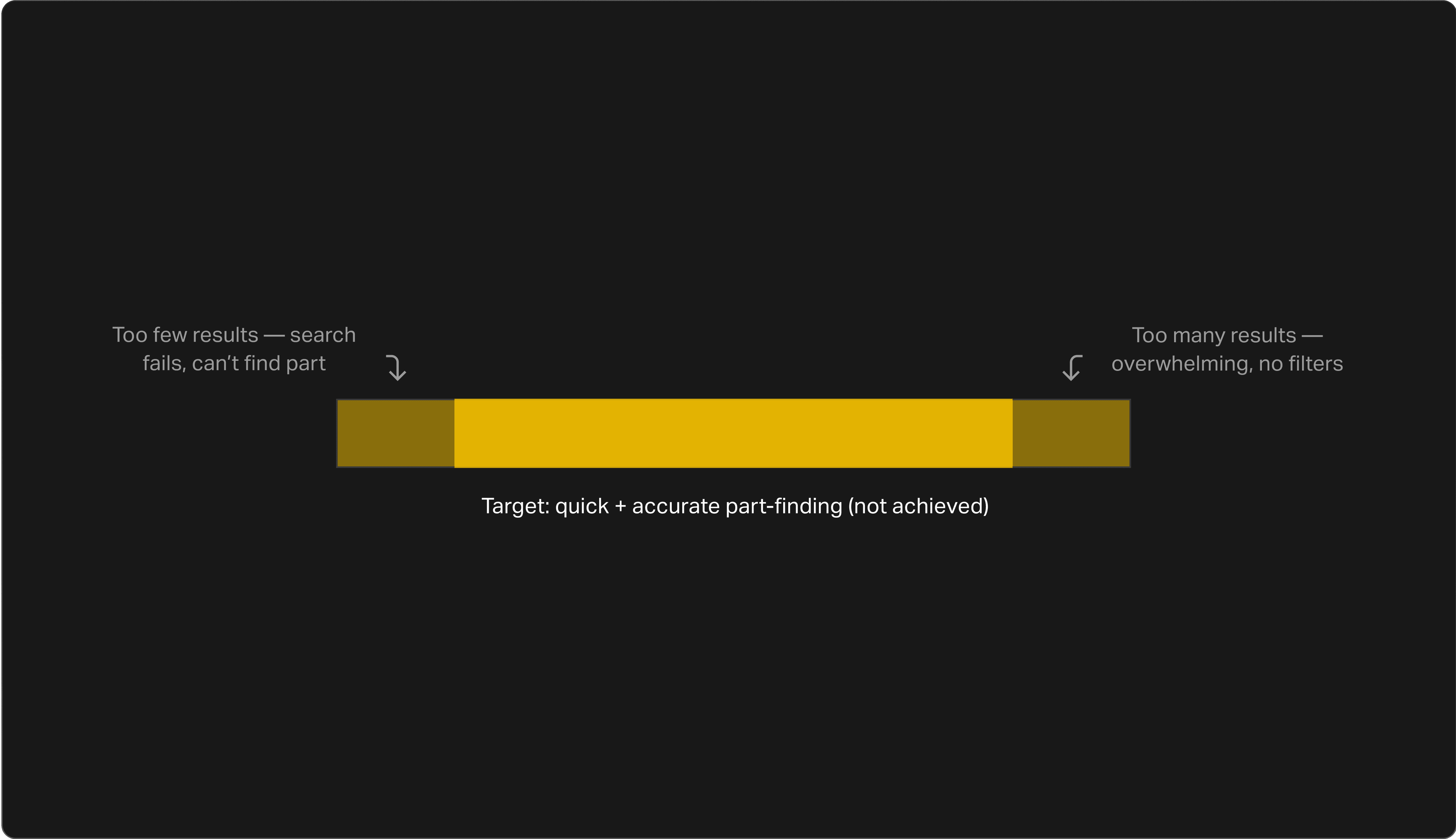
My Goal: Discover What’s Missing
Research
defining my strategy
This was a research-heavy process because uncovering the issues was critical. I focused my approach around key methods:

the methods i used
method 1: competitive analysis
I analyzed 10 apps, but narrowed my focus to three creative apps: Rebrickable, Meca Bricks, and LEGO Play. My takeaways were that all of these had clear and flexible filtering systems, active filters were visible and removable, and extra tagging options sped up search.
method 2: heuristic evaluation
To better understand Studio’s usability issues, I ran a heuristic evaluation of 15 elements of the part picker UI—a process that reviews the interface against established usability principles. Below are three examples of the problems users might run into:
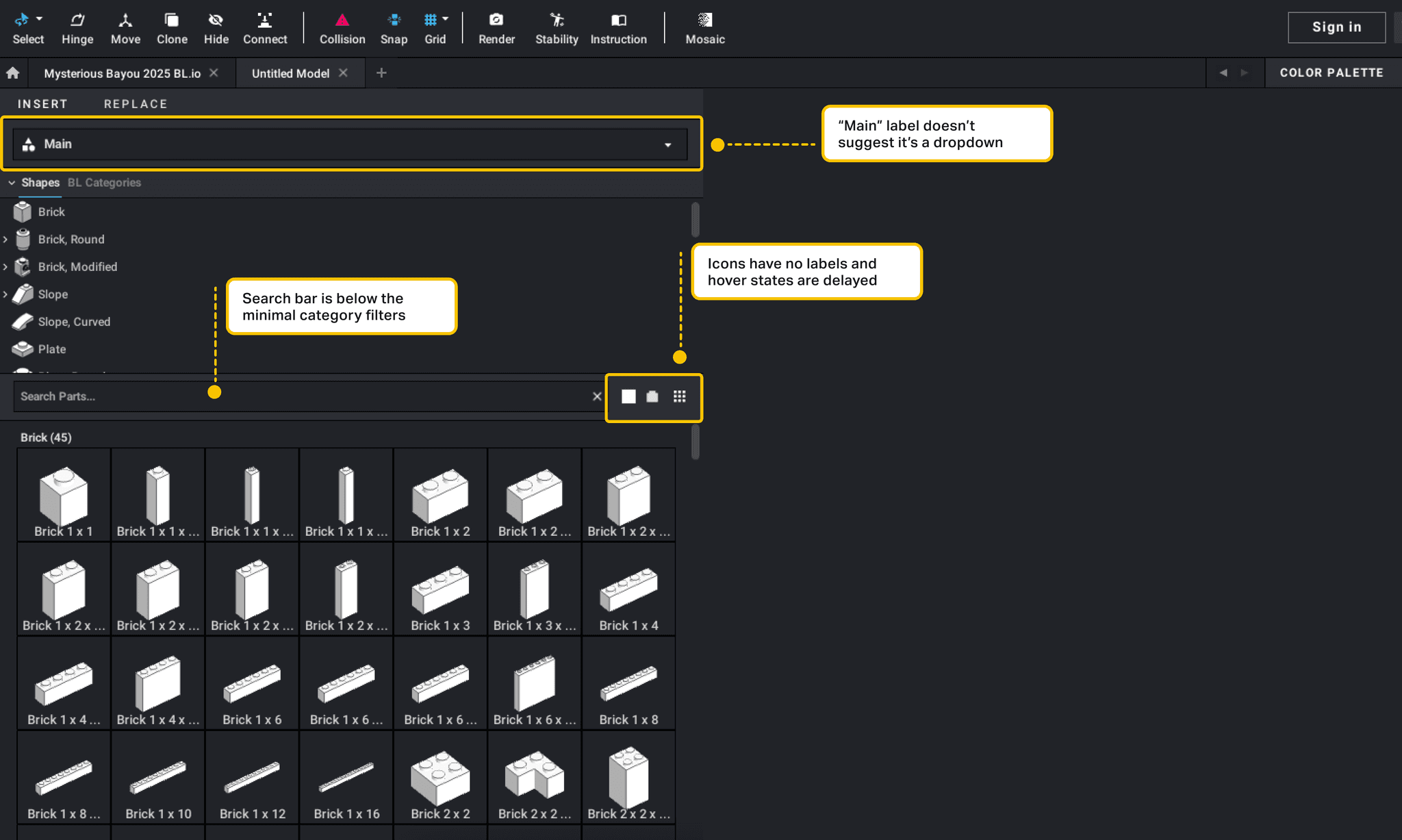
Annotated Usability Problems in Studio
method 3: user interviews
I interviewed seven users, split between beginners and advanced builders. I learned that beginners aren't using current filters, search isn't forgiving to incorrect names, and users feel lost in long result lists.
setup
landing on a filtering system
My research revealed three major needs: smarter search intelligence, standardized terminology, and more effective filtering. While all were important, I focused on filtering because it provided the clearest opportunity to shorten part-finding time. The other solutions required more extensive back-end changes, which were out of scope for this project.
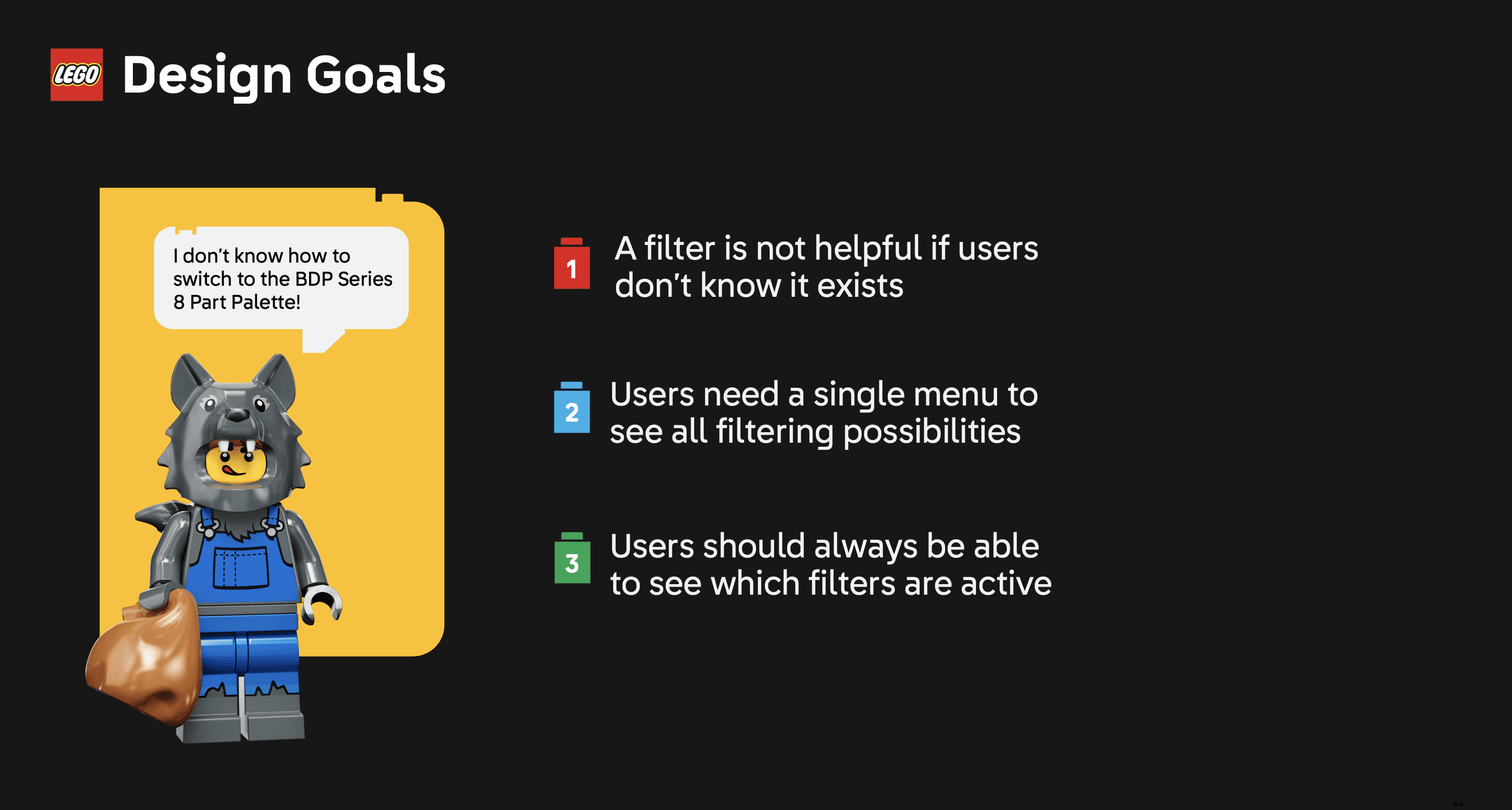
Turning Research into Actionable Goals
Three Weeks of Iterative Design Sprints
Because this change would significantly impact users, usability testing became central to the process. I would spend Monday ideating with engineers, Tuesday storyboarding, Wednesday creating the prototype, and Thursday/Friday testing.
version 1 (lofi)
Centralizing Filters Into a popup System
Version 1 introduced a popup filtering menu with four sections — palette, date filters, color filters, and display options — consolidating scattered controls into a single system while introducing filters users had asked for.
Turning user feedback into a filtering system
during testing, i realized that Extra clicks frustrated experts
During testing, all users agreed the new filters improved part searching and reduced confusion. However, expert users felt some actions required too many clicks and preferred having certain filters remain in the part picker UI and not in a popup.
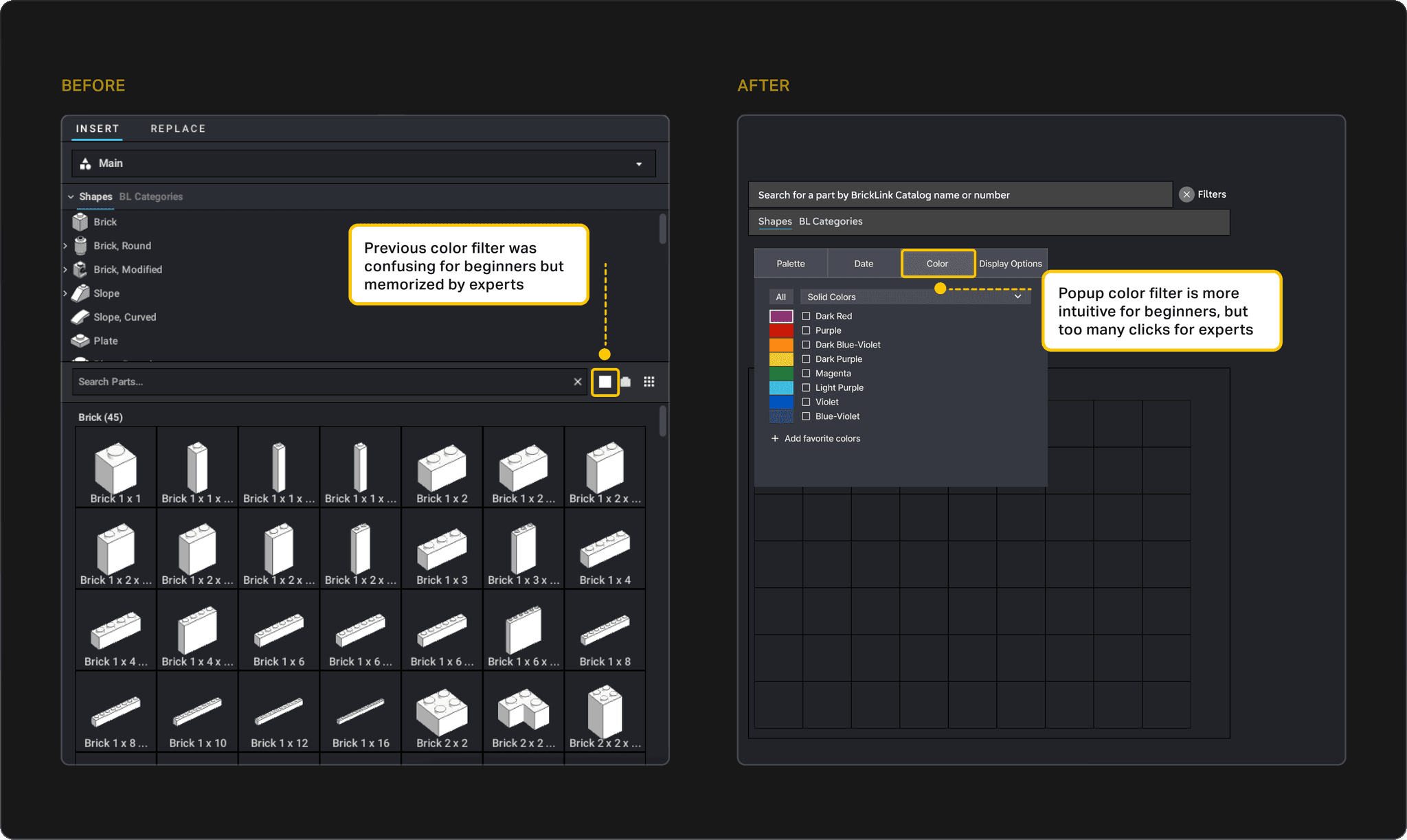
color filter before and after
a challenge: How might we streamline filtering to reduce clicks without increasing cognitive load?
This was a critical friction point. While the popup menu improved clarity for beginners, expert users felt slowed down by the extra clicks. The challenge was finding a way to keep filters easy to discover without sacrificing speed for power users.
version 2 (lofi)
A Flexible Solution: Collapsible sidebar
To balance discoverability for beginners with efficiency for expert users, I introduced a collapsible side bar. It could stay open for quick access or collapse to reduce clutter.
low fidelity prototype
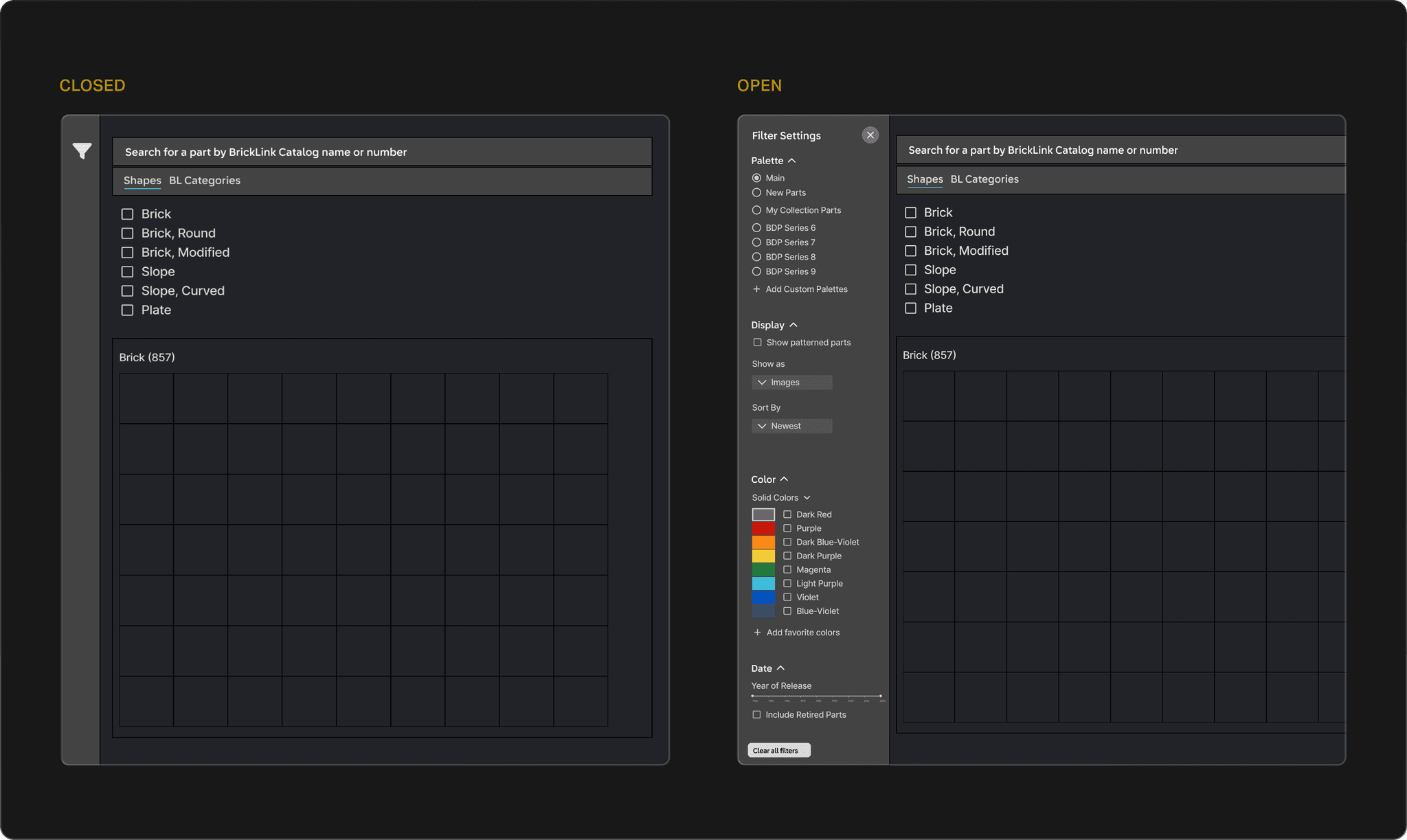
zooming into closed and open states
successful in user testing!
All the users responded positively to the collapsible side bar. They appreciated the flexibility to keep the menu open for efficiency or close it to reduce clutter. This new system also significantly sped up the part-finding process, showing that it successfully balanced usability for both beginners and experts.
final solution
a high fidelity Collapsible side Bar prototype
high fidelity prototype
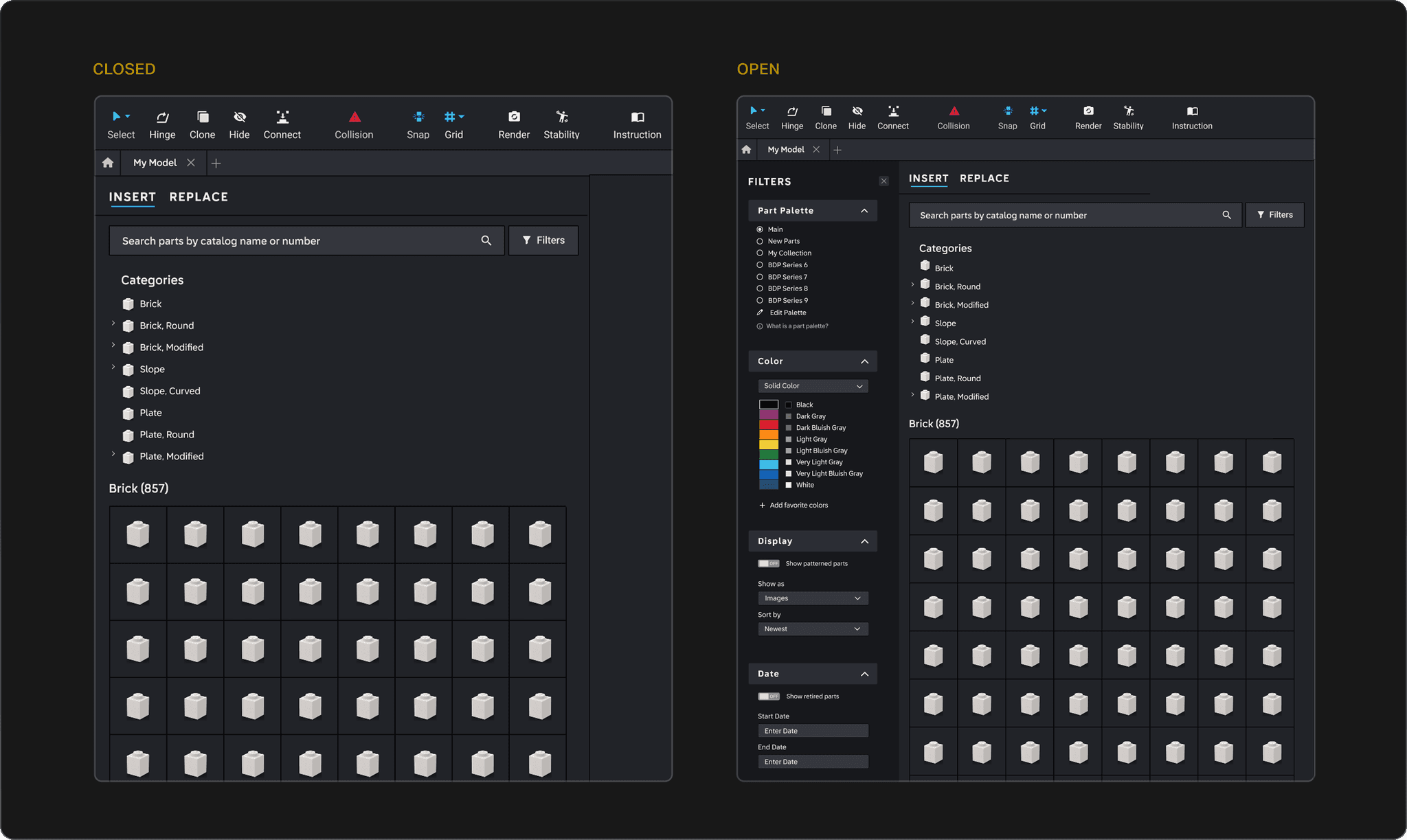
zooming into closed and open states
reflection
presenting to the office
I wrapped up my internship by presenting to the entire LEGO BrickLink team — including the CEO. It was rewarding to hear that even those with 10+ years at LEGO hadn’t noticed some of the usability challenges I uncovered, and exciting to know many of my features are headed into production.

A rewarding way to close my internship
reflections
This was just one of three projects I worked on at BrickLink, one of the most fun and creative places I’ve ever worked at. I loved being surrounded by a team that brought joy to people’s lives every single day. What stood out most to me was how passionate the community was—many users knew the platform even better than we did. Being able to learn from them made the experience even more special.
Project summary ✦
BrickLink Studio is the official LEGO digital building platform with over 160,000 builders, from beginners to experts. After discovering users struggled to find parts using exact-term search, I partnered with engineers and PMs to design a collapsible sidebar filtering system that improved discovery for newcomers while preserving the speed experts relied on.
OVERVIEW
6 Months Immersed in LEGO Design Culture
This year, I interned at the LEGO Group’s BrickLink office — one of the most creative and playful design cultures I’ve ever been part of. I loved designing for a passionate community of builders who often knew the product even better than we did.
This office made work feel like play
i worked on BrickLink Studio, a Digital Building Platform by the lego group
Studio is the official digital building app from the LEGO Group, used by over 160,000 fans worldwide. The platform allows builders to choose from thousands of LEGO bricks to create and share digital models, making it a popular tool for LEGO fans.
Studio interface with the Part Finder panel on the left
the problem: users couldn't find parts in studio
A major pain point with Studio is that users—both beginners and more advanced—were struggling to find parts. With so many potential reasons behind this friction, my goal was to uncover the root causes and redesign part finding to be more intuitive.
My Goal: Discover What’s Missing
Research
defining my strategy
This was a research-heavy process because uncovering the issues was critical. I focused my approach around key methods:
Applying these methods gave me a full picture of Studio’s strengths and pain points
method 1: competitive analysis
I analyzed 10 apps across CAD, 3D modeling, and non-creative tools, but narrowed my focus to three creative apps that better reflected Studio’s spirit of creativity and community:
Rebrickable
A part finding platform with a customizable part finder with keyword search, browsing, and filters to help find parts to build custom MOCs.
Meca Bricks
An online LEGO design tool for building with official or custom parts, including the ability to create and decorate pieces collaboratively.
LEGO Play
A mobile app focused on creative LEGO play, offering interactive building instructions designed to inspire kids’ exploration.
Key takeaways from these apps:

These takeaways in action:

Rebrickable’s filter system
method 2: heuristic evaluation
To better understand Studio’s usability issues, I ran a heuristic evaluation of 15 elements of the part picker UI—a process that reviews the interface against established usability principles. Below are three examples of the problems users might run into:
Annotated Usability Problems in Studio
Key takeaways from this analysis:

method 3: user interviews
I interviewed seven users, split between beginners and advanced builders. Through card sorting, a part-finding challenge, and open-ended questioning, I uncovered what frustrations or strategies shaped their process. Here were some learnings from my interviews:


user stories i created from my research
setup
landing on a filtering system
My research revealed three major needs: smarter search intelligence, standardized terminology, and more effective filtering. While all were important, I focused on filtering because it provided the clearest opportunity to shorten part-finding time. The other solutions required more extensive back-end changes, which were out of scope for this project.
Turning Research into Actionable Goals
Three Weeks of Iterative Design Sprints
Because this change would significantly impact users, usability testing became central to the process. Here’s what a typical design sprint week looked like for me:
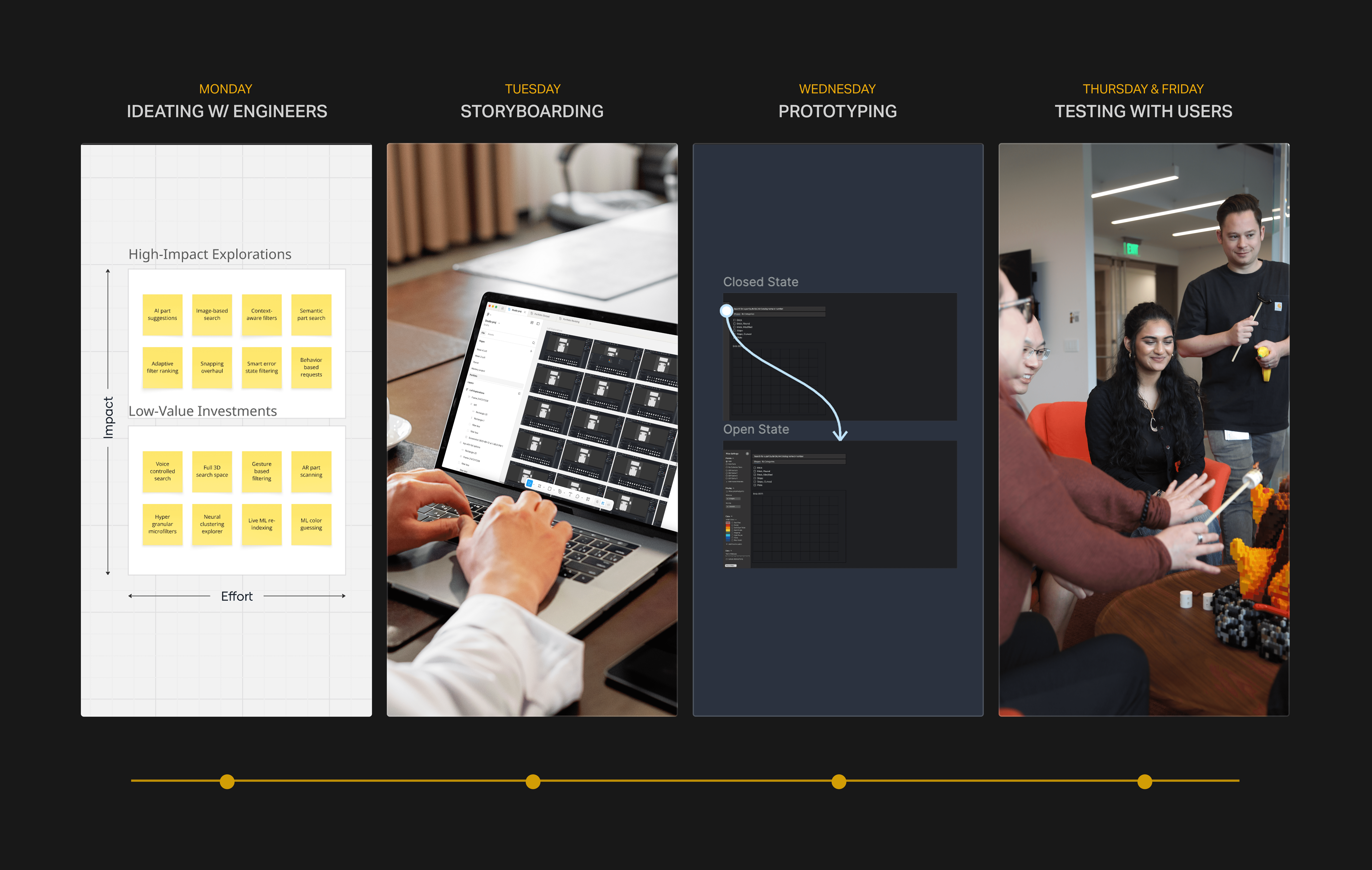
sprints with a focus on testing
version 1 (lofi)
Centralizing Filters Into a popup System
Version 1 introduced a popup filtering menu with four sections — palette, date filters, color filters, and display options — consolidating scattered controls into a single system while introducing filters users had asked for.
Turning user feedback into a cohesive filtering system
however, during testing, i realized that Extra clicks frustrated expert users
During testing, all users agreed the new filters improved part searching and reduced confusion. However, expert users felt some actions required too many clicks and preferred having certain filters remain in the part picker UI and not in a popup.
color filter before and after
a challenge: How might we streamline filtering to reduce clicks without increasing cognitive load?
This was a critical friction point. While the popup menu improved clarity for beginners, expert users felt slowed down by the extra clicks. The challenge was finding a way to keep filters easy to discover without sacrificing speed for power users.
version 2 (lofi)
A Flexible Solution: Collapsible sidebar
To balance discoverability for beginners with efficiency for expert users, I introduced a collapsible side bar. It could stay open for quick access or collapse to reduce clutter.
low fidelity prototype
zooming into closed and open states
successful in user testing!
All the users responded positively to the collapsible side bar. They appreciated the flexibility to keep the menu open for efficiency or close it to reduce clutter. This new system also significantly sped up the part-finding process, showing that it successfully balanced usability for both beginners and experts.
final solution
a high fidelity Collapsible side Bar that sped up part-finding by 67% for 160k lego users
high fidelity prototype
zooming into closed and open states
reflection
presenting to the office
I wrapped up my internship by presenting to the entire LEGO BrickLink team — including the CEO. It was rewarding to hear that even those with 10+ years at LEGO hadn’t noticed some of the usability challenges I uncovered, and exciting to know many of my features are headed into production.
A rewarding way to close my internship
learnings from the internship
This was just one of three projects I worked on at one of the most creative companies I’ve ever joined, and I loved being surrounded by a team that brought joy to people’s lives. What stood out to me was how passionate the community was; many users knew the platform even better than we did. Being able to learn from our users made the experience even more special.
Here are some of my biggest learnings from this project:

reach out to view my full project
This project came with plenty of other challenges and discoveries, from search intelligence to MVP designs. I’d be more than happy to walk you through the rest over a coffee chat or interview! In the meantime, check out my other projects:


Project summary ✦
BrickLink Studio is the official LEGO digital building platform with over 160,000 builders, from beginners to experts. After discovering users struggled to find parts using exact-term search, I partnered with engineers and PMs to design a collapsible sidebar filtering system that improved discovery for newcomers while preserving the speed experts relied on.
OVERVIEW
6 Months Immersed in LEGO Design Culture
This year, I interned at the LEGO Group’s BrickLink office — one of the most creative and playful design cultures I’ve ever been part of. I loved designing for a passionate community of builders who often knew the product even better than we did.
This office made work feel like play
i worked on BrickLink Studio, a Digital Building Platform by the lego group
Studio is the official digital building app from the LEGO Group, used by over 160,000 fans worldwide. The platform allows builders to choose from thousands of LEGO bricks to create and share digital models, making it a popular tool for LEGO fans.
Studio interface with the Part Finder panel on the left
the problem: users couldn't find parts in studio
A major pain point with Studio is that users—both beginners and more advanced—were struggling to find parts. With so many potential reasons behind this friction, my goal was to uncover the root causes and redesign part finding to be more intuitive.
My Goal: Discover What’s Missing
Research
defining my strategy
This was a research-heavy process because uncovering the issues was critical. I focused my approach around key methods:
these methods gave me a full picture of Studio’s strengths and pain points
method 1: competitive analysis
I analyzed 10 apps across CAD, 3D modeling, and non-creative tools, but narrowed my focus to three creative apps that better reflected Studio’s spirit of creativity and community:
Rebrickable
A part finding platform with a customizable part finder with keyword search, browsing, and filters to help find parts to build custom MOCs.
Meca Bricks
An online LEGO design tool for building with official or custom parts, including the ability to create and decorate pieces collaboratively.
LEGO Play
A mobile app focused on creative LEGO play, offering interactive building instructions designed to inspire kids’ exploration.
Rebrickable
A part finding platform with a customizable part finder with keyword search, browsing, and filters to help find parts to build custom MOCs.
Meca Bricks
An online LEGO design tool for building with official or custom parts, including the ability to create and decorate pieces collaboratively.
LEGO Play
A mobile app focused on creative LEGO play, offering interactive building instructions designed to inspire kids’ exploration.
Key takeaways from these apps:
These takeaways in action:
Rebrickable’s filter system
method 2: heuristic evaluation
To better understand Studio’s usability issues, I ran a heuristic evaluation of 15 elements of the part picker UI—a process that reviews the interface against established usability principles. Below are three examples of the problems users might run into:
Annotated Usability Problems in Studio
Key takeaways from this analysis:
method 3: user interviews
I interviewed seven users, split between beginners and advanced builders. Through card sorting, a part-finding challenge, and open-ended questioning, I uncovered what frustrations or strategies shaped their process. Here were some learnings from my interviews:

a user story i created from my research
setup
landing on a filtering system
My research revealed three major needs: smarter search intelligence, standardized terminology, and more effective filtering. While all were important, I focused on filtering because it provided the clearest opportunity to shorten part-finding time. The other solutions required more extensive back-end changes, which were out of scope for this project.
Turning Research into Actionable Goals
Three Weeks of Iterative Design Sprints
Because this change would significantly impact users, usability testing became central to the process. Here’s what a typical design sprint week looked like for me:
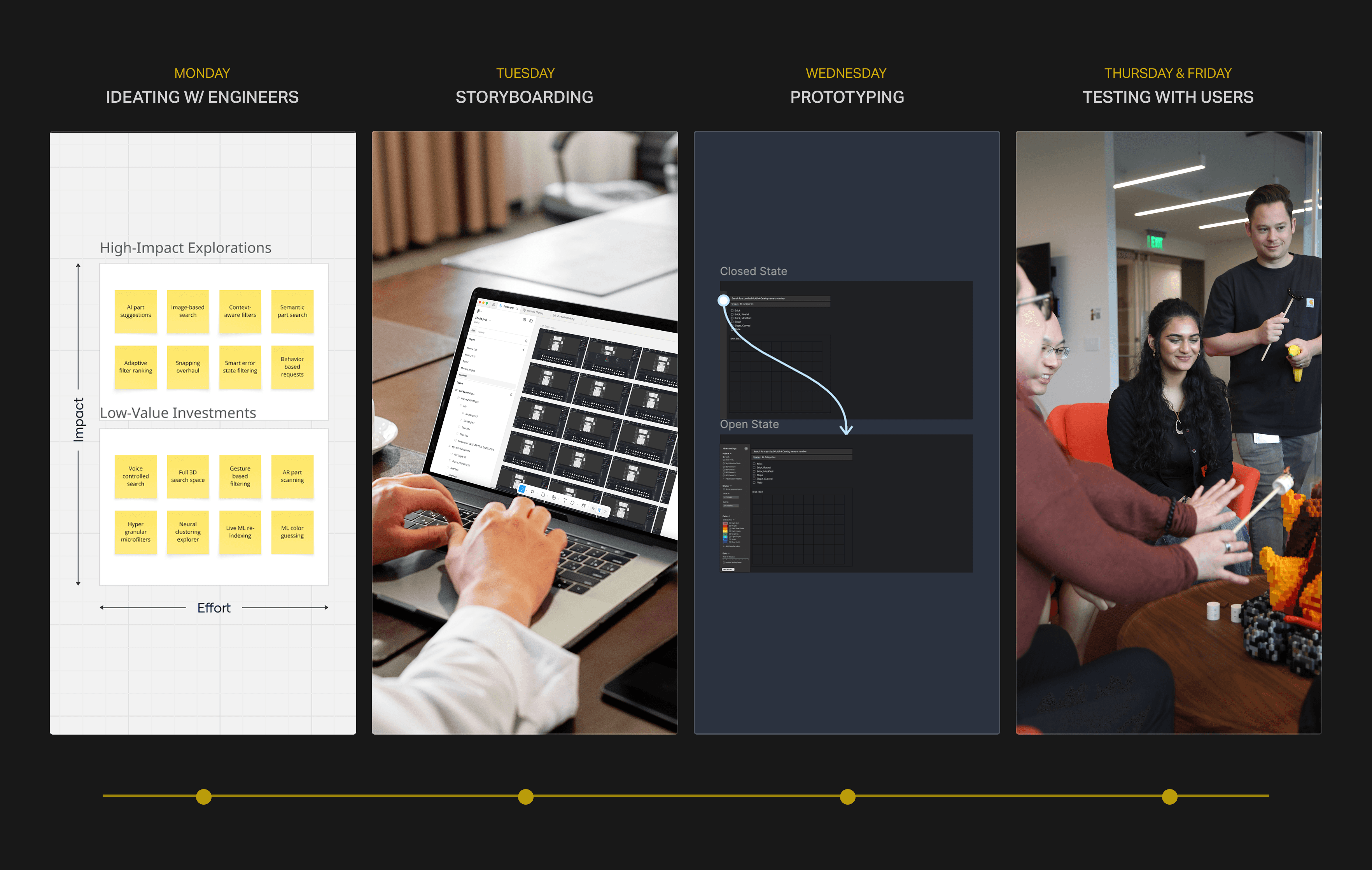
sprints with a focus on testing
version 1 (lofi)
Centralizing Filters Into a popup System
Version 1 introduced a popup filtering menu with four sections — palette, date filters, color filters, and display options — consolidating scattered controls into a single system while introducing filters users had asked for.
Turning user feedback into a cohesive filtering system
however, during testing, i realized that Extra clicks frustrated expert users
During testing, all users agreed the new filters improved part searching and reduced confusion. However, expert users felt some actions required too many clicks and preferred having certain filters remain in the part picker UI and not in a popup.
color filter before and after
a challenge: How might we streamline filtering to reduce clicks without increasing cognitive load?
This was a critical friction point. While the popup menu improved clarity for beginners, expert users felt slowed down by the extra clicks. The challenge was finding a way to keep filters easy to discover without sacrificing speed for power users.
version 2 (lofi)
A Flexible Solution: Collapsible sidebar
To balance discoverability for beginners with efficiency for expert users, I introduced a collapsible side bar. It could stay open for quick access or collapse to reduce clutter.
low fidelity prototype
zooming into closed and open states
successful in user testing!
All the users responded positively to the collapsible side bar. They appreciated the flexibility to keep the menu open for efficiency or close it to reduce clutter. This new system also significantly sped up the part-finding process, showing that it successfully balanced usability for both beginners and experts.
final solution
a high fidelity Collapsible side Bar that sped up part-finding by 67% for 160k lego users
high fidelity prototype
zooming into closed and open states
reflection
presenting to the office
I wrapped up my internship by presenting to the entire LEGO BrickLink team — including the CEO. It was rewarding to hear that even those with 10+ years at LEGO hadn’t noticed some of the usability challenges I uncovered, and exciting to know many of my features are headed into production.
A rewarding way to close my internship
reflections
This was just one of three projects I worked on at one of the most creative companies I’ve ever joined, and I loved being surrounded by a team that brought joy to people’s lives. What stood out to me was how passionate the community was; many users knew the platform even better than we did. Being able to learn from our users made the experience even more special.
Here are some of my biggest learnings from this project:
reach out to view my full project
This project came with plenty of other challenges and discoveries, from search intelligence to MVP designs. I’d be more than happy to walk you through the rest over a coffee chat or interview! In the meantime, check out my other projects:
A Filtering System for Part-Finding at the lEGO Group
2025